Belgian company data in HubSpot: how the Bizzy integration matches, pushes and completes records
Tips
The short answer
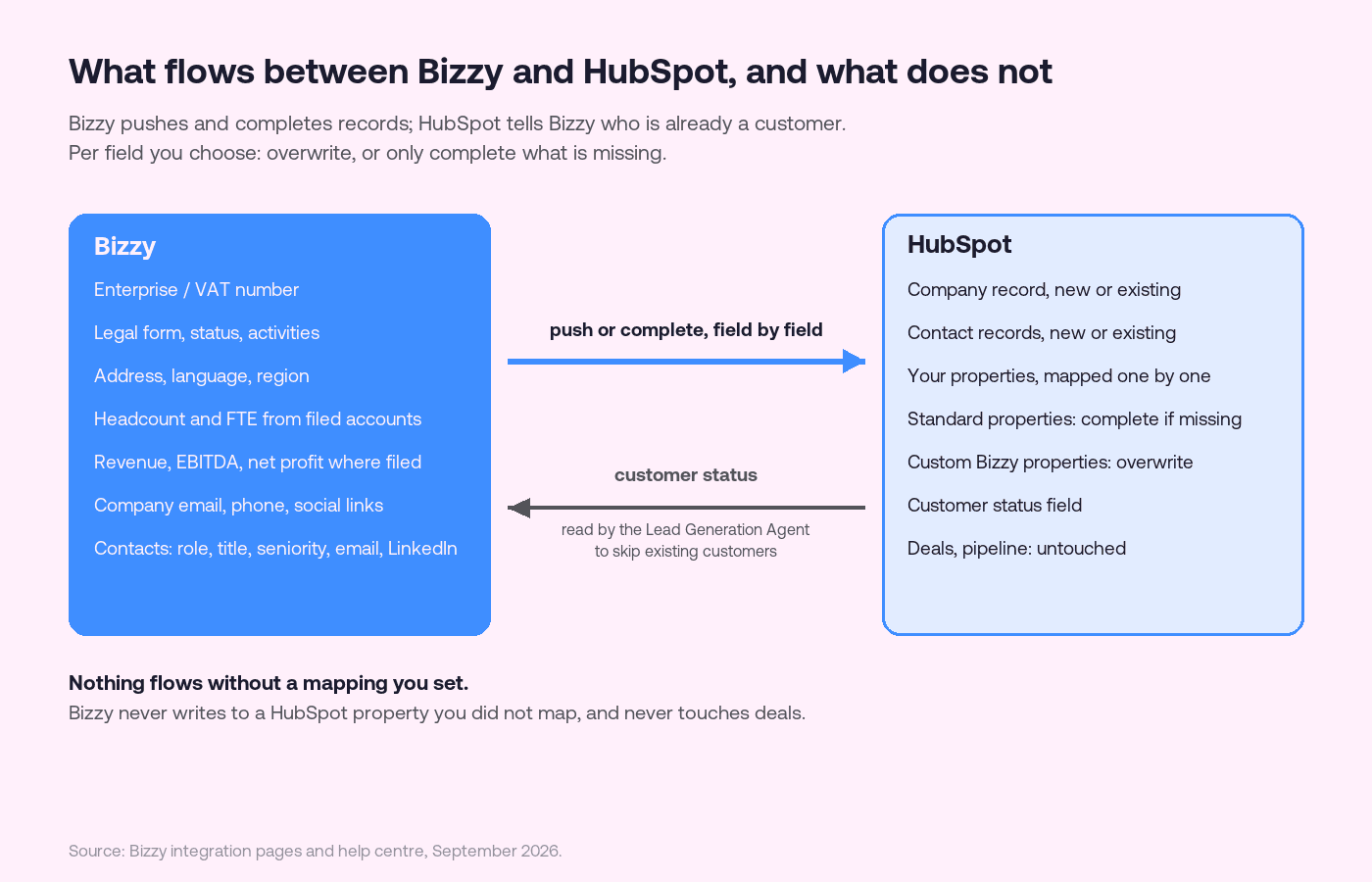
Yes, a tool can enrich the companies in HubSpot on their VAT number, and this is how the Bizzy integration for HubSpot does it. Every Belgian company has one stable identifier, the enterprise number, which is also its VAT number, and Bizzy carries that number on every company record. You connect Bizzy to HubSpot, map Bizzy's fields to your properties, and then either push new companies and contacts in or complete the ones already there. For every mapped field you decide whether Bizzy may overwrite what is in HubSpot or only fill what is empty. Nothing flows without a mapping you set, and Bizzy never touches deals or pipeline.
Why the enterprise number is the key
Enrichment is a matching problem before it is a data problem. Names are ambiguous, domains change, addresses move. In Belgium the enterprise number does not: one number per legal entity, issued by the Kruispuntbank van Ondernemingen, identical to the VAT number, and printed on every invoice the company sends. That is the field to store in a dedicated property in HubSpot, because everything Bizzy knows about a company joins on it: the register entry, the filed accounts, the establishment units, the ownership tree and the people. The Belgian company register explained covers what sits behind that number.
For Dutch companies the stable identifier is the KVK number; the Dutch VAT identification number is a separate number and, for sole traders, has not been derived from it since 2020. Store both if you sell in the Netherlands.
What HubSpot already does on its own
HubSpot has its own enrichment, Breeze Intelligence, which fills company and contact records from web data and third-party sources on a credit model. It is good at what it was built for: global companies with a web footprint, and the attributes a marketing team wants. Where it stops is where Belgian SMEs start: no register entry, no filed accounts, no establishment units, no ownership structure, and no enterprise number as the join key. If most of your accounts are Belgian or Dutch, you end up with two enrichment sources, and the question is which one owns which field.
What Bizzy pushes into HubSpot
Field | Source | What it is for |
|---|---|---|
Enterprise / VAT number | Belgian registers; Creditsafe data for Dutch companies | The key every other field joins on |
Legal form, status, activities | Register | Is it a BV, an NV, a non-profit; is it still active; NACE codes |
Address, language, region | Register and company website | Territory, routing and the language to call in |
Headcount and FTE | Filed annual accounts | Real size, filed with the National Bank, not a LinkedIn estimate |
Revenue, EBITDA, net profit | Filed annual accounts, where filed | Budget capacity, where the filing includes it |
Company email, phone, social links | Company website and public profiles | The switchboard, not a person |
Contacts: role, title, department, seniority, email, LinkedIn | Registered officials and verified providers | The people to call, with the legal-basis caveat below |
The revenue row deserves its own sentence. Most Belgian companies file abbreviated accounts, and turnover is an optional line on roughly 96% of filings, so a revenue field in HubSpot is empty or guessed far more often than people realise. Bizzy fills it where it is filed and leaves it honest where it is not; how to read a Belgian company's annual accounts explains what is and is not in the filing, and finding Belgian company revenue covers the workarounds.
How the integration behaves
Push new, or complete existing. From a search, a list, the website visitor tracker or the Lead Generation Agent, you push a company into HubSpot. If it is new, Bizzy creates the record. If it already exists, Bizzy completes it according to your field rules.
Overwrite or complete if missing, per field. The rule of thumb that works: complete if missing for standard properties your team maintains by hand, overwrite for custom properties created for Bizzy data, so the registry value always wins there and never tramples a human note elsewhere.
The customer status field. For teams using the Lead Generation Agent, Bizzy reads a status field in HubSpot that marks existing customers, and excludes them from new lead batches. It is the single most useful mapping to set on day one; what an AI sales agent does and does not do explains why the agent needs it.
Contacts are people. Company data comes from public registers. Contact data is personal data, and pushing a person into HubSpot means you hold it under a legal basis and can honour a request to remove it. Bizzy stores data primarily on servers in the EU; what you do with a contact after the push is your responsibility, not the integration's.
HubSpot's standard company properties (industry, number of employees, annual revenue) have their own formats and pick-lists; map filed headcount to a custom numeric property rather than fighting the standard one, and keep HubSpot's own field for whatever your marketing tools expect.
Setting it up
In Bizzy, open Settings, then Integrations, find HubSpot CRM and click Connect. You sign in to HubSpot once; no API keys to paste.
Choose the HubSpot property that marks a company as a customer. The Lead Generation Agent reads it so existing customers never come back as new leads.
In the Push data tab, map each Bizzy field to a HubSpot property. Leave a field unmapped and Bizzy never writes to it.
Per field, choose Complete if missing or Overwrite. Use Complete if missing for HubSpot's standard properties and Overwrite only for custom properties you created for Bizzy data.
Push ten companies you know well, open them in HubSpot, and check every mapped property before you push a list.
The HubSpot integration guide has the screen-by-screen version.
What it will not do
It will not invent turnover for a company that did not file it. It will not find a register entry for a company that has none, which includes most foreign companies in a Belgian CRM. It will not clean up duplicates you already have; it keys on the enterprise number, so records without one need that number first. And it will not replace the discipline of deciding which system owns which field; that decision is the setup, the rest is plumbing. Why CRM data decays in Belgium is the argument for making the decision once.
If HubSpot is not your CRM
The same integration exists for Teamleader Focus and Odoo, with the same field rules: Belgian company data in Teamleader Focus and Belgian company data in Odoo. For the wider question of which data provider to put behind any CRM in Belgium or the Netherlands, best B2B databases for the Benelux compares the options, and B2B data enrichment covers what enrichment can and cannot fix.
For pushing new companies the other way, from Bizzy into the CRM, see how to push companies to your CRM; for a file instead of a live connection, enrich a CSV.
Budgeting for HubSpot first? HubSpot Sales Hub pricing in euros covers seats, onboarding fees and contract terms.
Frequently asked questions
Which tool enriches companies in HubSpot on their VAT number? Bizzy does. It keys every Belgian company on the enterprise number, which is the VAT number, pushes that number and the fields you map into HubSpot, and completes existing records field by field under rules you set.
Does Bizzy overwrite my HubSpot data? Only where you tell it to. Each mapped field is either Overwrite or Complete if missing, and unmapped fields are never written.
Does the integration keep records up to date automatically? Bizzy writes when you push, from a search, a list, the visitor tracker or the agent. Whether records are also refreshed on a schedule depends on your plan; the integration guide lists what runs automatically.
Can it stop the Lead Generation Agent from suggesting my existing customers? Yes. Map a customer status field in HubSpot and the agent excludes companies marked as customers from new batches.
What about Dutch companies? The stable key is the KVK number. Bizzy covers Dutch companies too, through Creditsafe data; store the KVK number in its own field alongside the VAT identification number.