LinkedIn Sales Navigator: what it is, what it costs, and where it breaks down in Belgium
LinkedIn Sales Navigator is LinkedIn's paid sales tool. You search for people by role, company, seniority and behaviour, save leads and accounts, and get alerts when something changes.
It is a good product. It is also built around one assumption, and that assumption holds less well in Belgium than in the markets it was designed for. This piece covers what it does, what it costs, where it excels, and exactly where it struggles if you are targeting Belgian SMEs.
What it costs
Sales Navigator is sold per seat, in three tiers.
Plan | Price | Built for |
Core | around €121 per month, or €1,089 per year | individual sellers |
Advanced | around €148 per month, or €1,694 per year | sales teams |
Advanced Plus | on request | teams with CRM integration |
Those are list prices at the time of writing, and LinkedIn shows region-specific rates, so check your own on their comparison page.
Every tier includes 50+ search filters and 50 InMails a month. Buyer Intent and CRM integration start at Advanced, with the deeper CRM connections reserved for Advanced Plus.
Per seat that is considerably more than most Belgian company databases. That is not a criticism: you are paying for access to the network, not for a dataset.
Premium or Sales Navigator?
This is the question that comes up most, because LinkedIn sells two paid tiers that look similar.
Premium Business | Sales Navigator | |
Search filters | limited | more than 50 |
InMails per month | 15 | 50 |
Relationship Map | no | yes |
TeamLink | no | yes |
Alerts on changes | no | yes |
CRM integration | no | from Advanced |
One detail LinkedIn states itself and that is worth knowing: a Sales Navigator subscription includes the Premium Business features. So you are not choosing between two products, you are choosing whether you want the sales tooling on top of Premium.
The practical dividing line is search. If you use LinkedIn mainly to strengthen your profile and occasionally reach someone, Premium is enough. If you build lists systematically and track accounts, the filters and alerts are exactly what Sales Navigator exists for.
The one-month trial
Sales Navigator has a free trial of one month, with three conditions worth knowing before you start.
A credit card is required. The trial converts to a paid subscription automatically if you do not cancel.
Cancellation must happen at least one day before it ends. LinkedIn emails a reminder seven days ahead, but the responsibility is yours.
You only qualify once a year. The trial is for members who are not on a paid LinkedIn subscription at the time and have not used a LinkedIn trial in the previous 365 days.
Practical advice: spend that month on the test described further down rather than on learning the product. Looking up twenty existing customers tells you more in half an hour than four weeks of clicking around.
What it is genuinely good at
Be honest about what a competitor does well, or the rest of your analysis is not worth much either.
Finding a name at a company you already know. You know which company you want, you need to know who controls the budget. Sales Navigator is unmatched at this.
Seeing when someone changes job. A new decision-maker is among the most reliable buying signals there is, and LinkedIn sees it before any registry source does.
Warm introductions. TeamLink shows who in your organisation already has a connection. No register can do that.
Large enterprises. At companies of any size, LinkedIn coverage is high and the filters work as intended.
If that describes your work, Sales Navigator is probably the right tool and you can stop reading.
Which filters you actually use
Sales Navigator advertises more than fifty filters. In practice the work runs on about ten.
For finding people, the most useful are function, seniority (from Director through to CXO), current company, region and company headcount. On top of those LinkedIn has two you will not find anywhere else: Shared Experiences, which surfaces former colleagues and alumni, and Job Changes, which shows who recently moved role.
Those last two are the real reason to pay for Sales Navigator. A new decision-maker at an account is among the most reliable buying signals there is, and no register sees it.
Searches can be saved as lead lists and account lists, with alerts when new results appear or when a saved lead changes something.
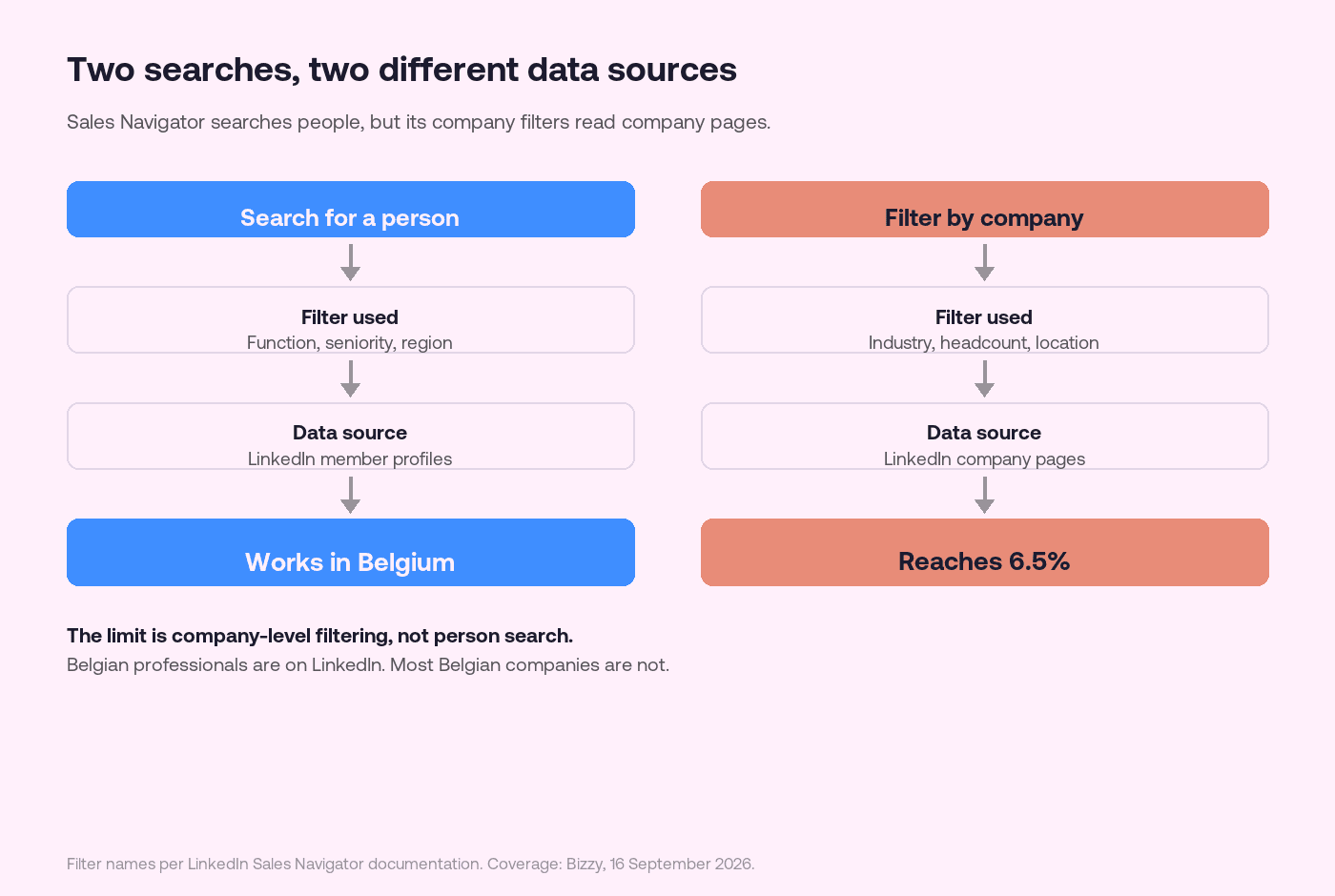
Note the distinction that the next section turns on: the people filters read member profiles, the company filters read company pages. Those are two different sources with two very different coverage levels.
Where it breaks down in Belgium
The distinction that matters is this. Sales Navigator searches people, but filters on company attributes that come from LinkedIn company pages.
Search for "marketing managers in Belgium" and it works. Individual Belgian professionals are on LinkedIn.
Search for "construction companies with 10 to 50 employees in West Flanders" and that filter depends on company pages. That is where the problem sits.
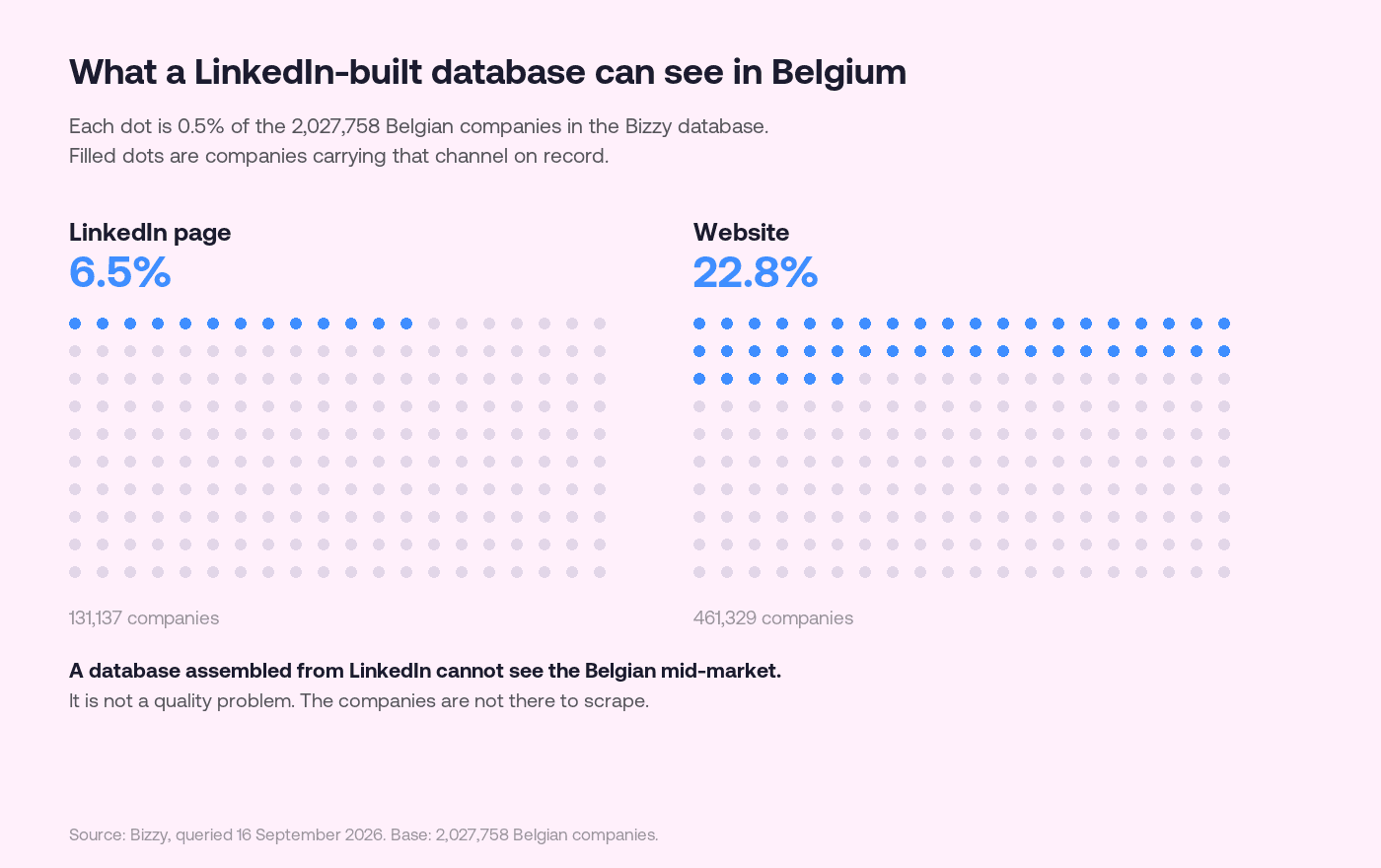
Of the 2,027,758 Belgian companies in our database, 6.5% have a LinkedIn company page. That is 131,137 of them.
The rest exist. Their managing director may well have a personal LinkedIn profile. But without a company page there is nothing for company filters to act on: no sector, no headcount, no location the filter recognises.
The result is that company-level filters keep returning the same group: larger, digitally active Belgian businesses. Precisely the group everyone else is already working.
We set that pattern out more fully in why international prospecting tools miss Belgian SMEs.
The export question
Sales Navigator has no bulk export of leads to CSV. That is a deliberate choice by LinkedIn and it is written into their terms: the data stays inside the platform.
For social selling that is fine. If you want a list in your CRM, a sequence built, or a segment sized, you are working against the product. Scrapers exist that get around this; they breach LinkedIn's terms and we do not recommend them.
This is not a defect, it is a design decision. But it does determine whether the tool fits your workflow.
How InMail credits actually work
This is where most of the confusion sits, and the rules are simpler than people assume.
You get 50 InMail credits a month, on every tier: Core, Advanced and Advanced Plus. The more expensive plan does not buy you more messages.
Credits do not expire and roll over to the next month. There is a ceiling though: you can accumulate a maximum of 150. Send nothing for three months and you are at the cap, after which new credits are lost.
That cap is the reason not to hoard InMail. Three months of inactivity literally costs you credits.
For a Belgian sales team, 50 per person per month is ample, because InMail is meant for the cases where you have no other channel. If InMail has become your primary channel, that usually signals a problem with your list rather than a need for more credits.
Where it sits next to your CRM
CRM integration is not in the entry plan. It arrives at Advanced, and the deeper connections to Salesforce, HubSpot, Microsoft Dynamics and Oracle are reserved for Advanced Plus, which is priced on request.
That matters for the arithmetic. If you want leads to land in your CRM automatically, you are not on the €121 plan, you are on the most expensive tier.
Without that integration the workflow is manual: you find someone in Sales Navigator and move them across yourself. At ten accounts a week that is fine. At a hundred it is a part-time job, and that is exactly where the missing bulk export from the previous section starts to bite.
When to use which
Sales Navigator alone is enough if you sell to larger enterprises, you work from relationships and network, and you work account by account rather than segment by segment.
A registry source alone is enough if you target Belgian SMEs by sector, region or size, and you need to work through hundreds of companies a quarter.
Both is the realistic setup for many Belgian teams, and the order matters: build the company list from the register, because that is the only complete source, then use Sales Navigator to find and approach the right person at the companies you selected.
That order is the whole point. Start at LinkedIn and the 6.5% defines your market. Start at the register and you define it yourself.
How to build that list is in generating leads: from a company list to a conversation, and how to filter on attributes that genuinely exist is in building an ICP on filters that actually exist.
Frequently asked questions
What is LinkedIn Sales Navigator exactly?
LinkedIn's paid sales tool. It searches people and companies through more than fifty filters, saves leads and accounts, alerts you to changes, and sends InMails. It is built on the LinkedIn network rather than on a company register.
What does Sales Navigator cost?
Core is around €121 a month or €1,089 a year per seat, Advanced around €148 a month or €1,694 a year. Advanced Plus is on request. These are list prices at the time of writing and vary by region.
Is Sales Navigator suitable for Belgian SMEs?
For finding a person at an SME you already know, yes. For assembling a list of Belgian SMEs by sector or size, less so, because those filters rely on LinkedIn company pages and only 6.5% of Belgian companies have one.
Can I export leads from Sales Navigator?
Not in bulk to CSV. LinkedIn deliberately keeps the data inside the platform. If you need lists in your CRM or in a sequence, you need a different source for the list part.
Do I need both Sales Navigator and a company database?
Often yes, and they do different jobs. The register gives you the full Belgian population to select from; Sales Navigator gives you the right person and a warm way to reach them. Start with the register, not with LinkedIn.
What is the difference between LinkedIn Premium and Sales Navigator?
Premium Business gives limited search filters and 15 InMails a month. Sales Navigator gives more than 50 filters, 50 InMails, Relationship Map, TeamLink and alerts on changes. A Sales Navigator subscription also includes the Premium Business features.
How long is the free trial?
One month from the point you activate it. A credit card is required and the trial converts to a paid subscription automatically, so cancellation has to happen at least one day before it ends. You only qualify if you have not used a LinkedIn trial in the previous 365 days.
Do unused InMail credits roll over?
Yes. Credits do not expire and carry into the next month, but you can accumulate a maximum of 150. At that ceiling new credits are lost, so saving them up for months actually costs you credits.
Is CRM integration included in the cheapest plan?
No. CRM integration starts at Advanced, and the connections to Salesforce, HubSpot, Microsoft Dynamics and Oracle sit in Advanced Plus, which is priced on request. Do not budget for it on the entry plan.